

A user story is a short, plain-language description of something a user needs from your product, written so that the people building it can discuss it, estimate it and test it. This guide covers the template, the 3 Cs, INVEST, acceptance criteria, splitting, common mistakes and a worked example from a founder's note to a sprint-ready story.
Updated October 2026. Looking for something narrower? See 40 user story examples with acceptance criteria, the user story template, user stories vs use cases and user story mapping.
 User Stories BotA demo video on every pull request
Get a demo video on every new feature
GitHub App that watches your pull requests and records a narrated, captioned demo.
Save time on demo prep and make informed decisions faster with a video walkthrough of every new feature.
What is a user story?
A user story describes a piece of functionality from the point of view of the person who wants it. It names who the user is, what they want to do and why it matters to them. It leaves out how the feature will be built; the team decides that later.
User stories come from Extreme Programming in the late 1990s (Agile Alliance) and are now how most Scrum and Kanban teams fill their backlog. In practice, a story is a placeholder for a conversation, not a specification.
The 3 Cs: card, conversation, confirmation
In 2001 Ron Jeffries described a user story as three things, now known as the 3 Cs:
- Card: the story fits on an index card or a ticket title. It is a reminder, not the whole requirement.
- Conversation: the product owner, designer, developers and tester work out the details by talking, and attach the decisions to the story.
- Confirmation: acceptance criteria state how everyone will know the story is done. They turn the conversation into something you can test.
Skip the conversation and the card gets treated as a full spec. Skip confirmation and the sprint review turns into an argument about whether the feature is finished.
The user story template
The most common format is the role-feature-benefit template. The Agile Alliance dates it to a team at Connextra in 2001, and Mike Cohn's book User Stories Applied made it the standard (Mountain Goat Software):
As a [type of user], I want [some goal or action] so that [some benefit or reason].
| Part | What it answers | Weak | Better |
|---|---|---|---|
| As a… | Who needs this? A specific role or persona, not “the user”. | As a user | As a returning customer with a saved card |
| I want… | What do they want to do, in their words? | I want a dashboard | I want to see which invoices are overdue |
| So that… | Why does it matter? This is the value, and it guides trade-offs. | so that I can use the dashboard | so that I can chase late payers before month-end |
Teams most often drop the so-that clause or just restate the goal in it. Keep it: the benefit is what lets the team spot a cheaper way to deliver the same value.
In Jira, Linear or Notion a story also carries an ID, priority, an estimate, acceptance criteria and links to designs. The user story template has a copy-ready card with every field.
How to write a user story in 7 steps
- Start from a real user. Pick the role or persona this story serves. Personas only help when they are based on people you have talked to.
- Name the goal, not the feature. Write what the user is trying to get done (“see which invoices are overdue”), not the interface (“a red badge”).
- State the benefit. Finish the so-that clause with an outcome the user or the business cares about. If you can't, ask whether the story is needed at all.
- Draft acceptance criteria. Write three to six conditions that must be true for the story to be done, including at least one unhappy path: an error, an empty state, a permission the user lacks.
- Check it against INVEST: independent, negotiable, valuable, estimable, small, testable. Fix whichever letter fails (see below).
- Split it if it is too big. If the team can't finish it within a sprint, ideally within a few days, slice it into thinner stories that each still deliver something a user can see.
- Refine it with the team. In backlog refinement, developers spot technical risks and testers spot missing cases. Update the card with what you agree.
Who writes them? The product owner usually owns the backlog, but anyone can propose a story: founders, designers, developers, support staff.
Acceptance criteria, briefly
Acceptance criteria are the confirmation in the 3 Cs: testable conditions a story must meet, agreed before development starts so scope doesn't grow mid-sprint. Two formats cover most teams.
A checklist is the fastest to write and works for simple stories. For “As a returning customer, I want to reset my password so that I can get back into my account without contacting support”:
- A reset link is emailed within one minute of the request.
- The link expires after 30 minutes and works only once.
- The form shows the same message whether or not the address has an account, so nobody can use it to check which emails are registered.
- After a successful reset, all other sessions are signed out.
Given/When/Then comes from behaviour-driven development, which Dan North introduced in the mid-2000s. It is the syntax that tools like Cucumber can run as automated tests (Gherkin reference), and it suits stories with several scenarios or business rules:
- Given I requested a password reset 31 minutes ago
- When I open the reset link
- Then I see a message that the link has expired
- And I can request a new link from the same page
Aim for three to six criteria per story; many more usually means the story should be split. Acceptance criteria belong to one story, while the definition of done applies to every story. The template post covers both formats in depth.
The INVEST checklist
Bill Wake proposed INVEST in a 2003 article as a quick test of story quality, and Mike Cohn's User Stories Applied spread it widely (Agile Alliance summary). Run every story through it before sprint planning.
| Letter | Means | Ask yourself |
|---|---|---|
| I | Independent | Can this be built and released without waiting for another story? If two stories always ship together, merge them or split differently. |
| N | Negotiable | Does it leave the team room to choose how? A story that dictates the screens and the database is a spec, not a story. |
| V | Valuable | Would a user or the business notice if it shipped? “Set up the database” fails this on its own. |
| E | Estimable | Does the team understand it well enough to size it? If not, run a short, time-boxed spike first. |
| S | Small | Can it be finished within one sprint, ideally in a few days? |
| T | Testable | Can you write criteria that clearly pass or fail? “The page should be fast” is not testable; “the page loads in under 2 seconds on a mid-range phone over 4G” is. |
A story that fails one letter is a prompt to rewrite or split it; the user story mapping guide goes deeper.
Epics, user stories and tasks
Most backlogs have three levels:
- Epic: a large body of work that delivers one outcome and is too big for a sprint, for example “Customers can pay online” (Agile Alliance on epics).
- User story: a slice of the epic a team can finish in a sprint, for example “As a customer, I want to pay an invoice by card so that I don't have to arrange a bank transfer.”
- Task: the technical work that delivers a story, written by the developers, for example “Add the payment provider's webhook handler.” Tasks are not user stories and don't need the template.
Many teams estimate stories in story points, a relative measure of effort and uncertainty, rather than hours. The number means nothing outside the team; it helps spot stories that are too big and plan a sprint. Some teams skip estimates and keep every story small instead.
How to split a story that is too big
A story is too big when the team can't finish it in a sprint or can't estimate it. Split it vertically, so each new story still delivers something a user can see, not into front-end, back-end and database stories that are worthless on their own. Common patterns:
- By workflow step: “book a class” becomes search classes, pick a time, pay, get a confirmation.
- By business rule: ship the standard case first, then the exceptions such as discount codes, refunds or regional tax.
- By user role: the member's view first, the admin's view next.
- Defer quality attributes: make it work first, then make it fast or able to handle large volumes in a follow-up story with its own criteria.
- Spike: if the team can't estimate, time-box a research story (“one day to confirm the bank API supports refunds”) and write the real stories afterwards.
Story mapping, which Jeff Patton developed and describes in his book User Story Mapping, makes splitting visual. The user's journey runs left to right as the backbone, and the detailed stories hang below each step. A horizontal line across the map gives you a release slice, which is how many teams find their smallest useful MVP (Agile Alliance on story mapping).
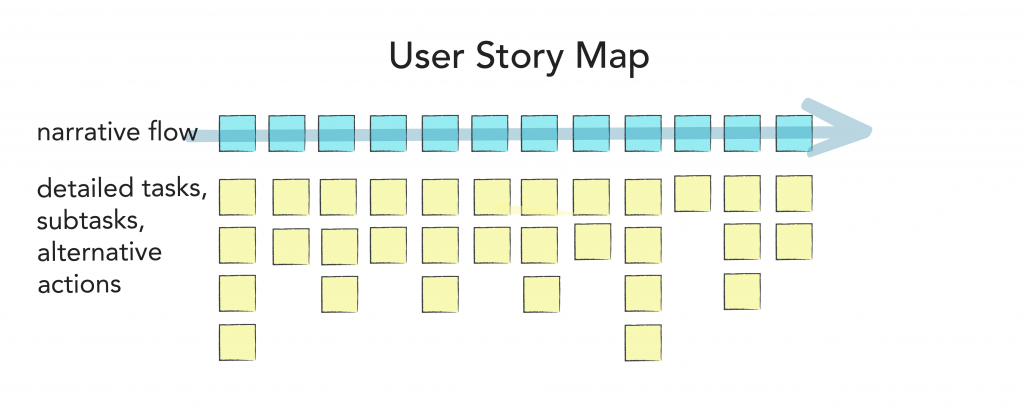
The user story mapping guide shows how to build one and cut an MVP release from it.
Common user story mistakes, with fixes
| Mistake | Example | Better |
|---|---|---|
| Writing tasks as stories | As a developer, I want to set up the database so that we can store data. | Fold the work into the story it serves: “As a new user, I want to sign up with my email so that my projects are saved.” |
| Vague role | As a user, I want notifications. | As a project owner, I want an email when a teammate misses a deadline so that I can reassign the work. |
| No benefit | As a shopper, I want a wishlist. | As a shopper, I want to save products to a wishlist so that I can buy them when they go on sale. |
| Solution baked in | As a manager, I want a dropdown with 12 report filters. | As a manager, I want to filter the sales report by region and month so that I can compare teams. Let design choose the control. |
| Too big | As a customer, I want to manage my account. | Split it: change my email, change my password, download my invoices, close my account. |
| Written alone, handed over | 200 stories written by one person before the team sees any of them. | Write a sprint or two ahead, refine together, and keep the rest as epics. |
More bad-to-good rewrites, plus stories for eight product types, are in user story examples.
A worked example, from idea to sprint-ready story
Here is one story taken through every step above. The product is a shift-scheduling app for small restaurants. The founder's note says: “Staff keep texting the manager to swap shifts. Fix that.”
1. Find the user and the goal
Two users are involved: the worker who can't make a shift and the manager who owns the schedule. Start with the worker, who triggers the swap.
2. Write a first draft
As a shift worker, I want to swap shifts with coworkers in the app so that I don't have to text the manager.
3. Run the INVEST check
Valuable and testable: yes. Small: no, because “swap” hides offering a shift, claiming it, manager approval and notifications. Estimable: not yet, because nobody knows whether managers want to approve swaps.
4. Talk it through and split it
In refinement the founder says some managers want to approve swaps and others don't. The team splits the draft:
- As a shift worker, I want to offer my shift to qualified coworkers so that I can take time off without texting the manager.
- As a coworker, I want to claim an offered shift so that I can pick up extra hours.
- As a manager, I want to choose whether swaps need my approval so that I stay in control of who works when.
5. Add acceptance criteria to the first story
- Given I am scheduled for a shift that starts in more than 24 hours, when I offer it, then every coworker qualified for that role is notified and the shift shows as “Offered” on the schedule.
- Given my shift starts in less than 24 hours, when I try to offer it, then I see a message asking me to contact the manager.
- Given I offered a shift that nobody has claimed, when I withdraw the offer, then the shift goes back to “Scheduled” and coworkers can no longer claim it.
- Until someone claims the shift, it stays assigned to me.
6. Ready for the sprint
The story has a user, a goal, a benefit and four testable criteria including two unhappy paths, and the team sizes it at two to three days. SMS notifications are parked as a later story, and the 24-hour cut-off is recorded as a business rule the founder can change.
Writing user stories with AI, responsibly
Assistants such as ChatGPT, Claude and Gemini are good at the mechanical parts of story writing. They don't replace knowing your users.
Where AI helps:
- Turning messy notes, interview transcripts or a support-ticket export into a first set of draft stories.
- Suggesting acceptance criteria, especially unhappy paths and edge cases that are easy to forget.
- Proposing ways to split a large story and checking drafts against INVEST.
Where it doesn't:
- It doesn't know your users or constraints unless you tell it, so it fills gaps with plausible guesses.
- It tends to over-produce: twenty stories where five matter. Prioritising is still your job.
- It can't replace the conversation: an undiscussed generated story is as easy to misread as a hand-written one.
A useful prompt gives context and asks for a specific format:
You are helping a product team write user stories. Product: a shift-scheduling app for small restaurants. Users: shift workers and managers. Problem: staff text the manager to swap shifts. Write 5 user stories in the format “As a…, I want…, so that…”, each with 3-5 acceptance criteria in Given/When/Then, including at least one unhappy path. List every assumption you made.
Before a generated story enters the backlog, check that the role is a real user, the benefit is true and the criteria are testable. Check your company's policy before pasting customer data or confidential plans into an AI tool, and strip personal data from transcripts.
If you would rather answer questions than write prompts, our User Stories Bot asks you about your project and turns the answers into a PDF of user stories you can take into refinement.
User stories, use cases and job stories
User stories are not the only format. Use cases describe an actor's interaction with the system step by step and suit regulated or fixed-scope projects. Job stories (“When [situation], I want to [motivation], so I can [outcome]”) put the situation first. User stories vs use cases vs job stories compares the three, with the same feature written each way.
From user stories to an MVP
For a first release, stories define what to build and, through the story map, what to leave out. When we build MVPs at KFG International, the first workshop produces a story map, we cut the thinnest slice that lets a real user complete the core journey, and that slice becomes the first sprint backlog. Everything below the line waits for feedback from real users. If you don't have a technical team, how to build an MVP as a non-technical founder explains your options for getting that first slice built.
Have a backlog, or just a story map on a whiteboard? Our developers turn it into working software sprint by sprint: see our monthly development plans.
Frequently asked questions
What are the three parts of a user story?
The sentence has three parts: the role (as a…), the goal (I want…) and the benefit (so that…). The story as a whole is often described with Ron Jeffries' 3 Cs: the card, the conversation that fills in the details, and the confirmation, which is the acceptance criteria.
Who writes user stories in agile?
The product owner or product manager usually owns and prioritises them, but anyone on the team or a stakeholder can propose one. What matters is that the team refines each story together before it enters a sprint.
How detailed should a user story be?
Detailed enough for the team to estimate and test it, and no more. Stories for the next sprint carry acceptance criteria and designs; stories further away can stay as one line or part of an epic.
What is the difference between a user story and a requirement?
A traditional requirement states what the system shall do, often in full detail up front. A user story states what a user needs and why, and leaves the detail to a conversation and the acceptance criteria. Stories still capture requirements; they just do it incrementally.
How many user stories fit in a sprint?
There is no fixed number; it depends on team size, sprint length and story size. Many teams aim for stories of one to three days, which means several per developer in a two-week sprint.
Can AI write user stories?
AI can draft stories and acceptance criteria quickly from notes or transcripts, and it is good at spotting missing edge cases. It can't know your users or priorities, so treat its output as a draft and refine it with the team like any other story.